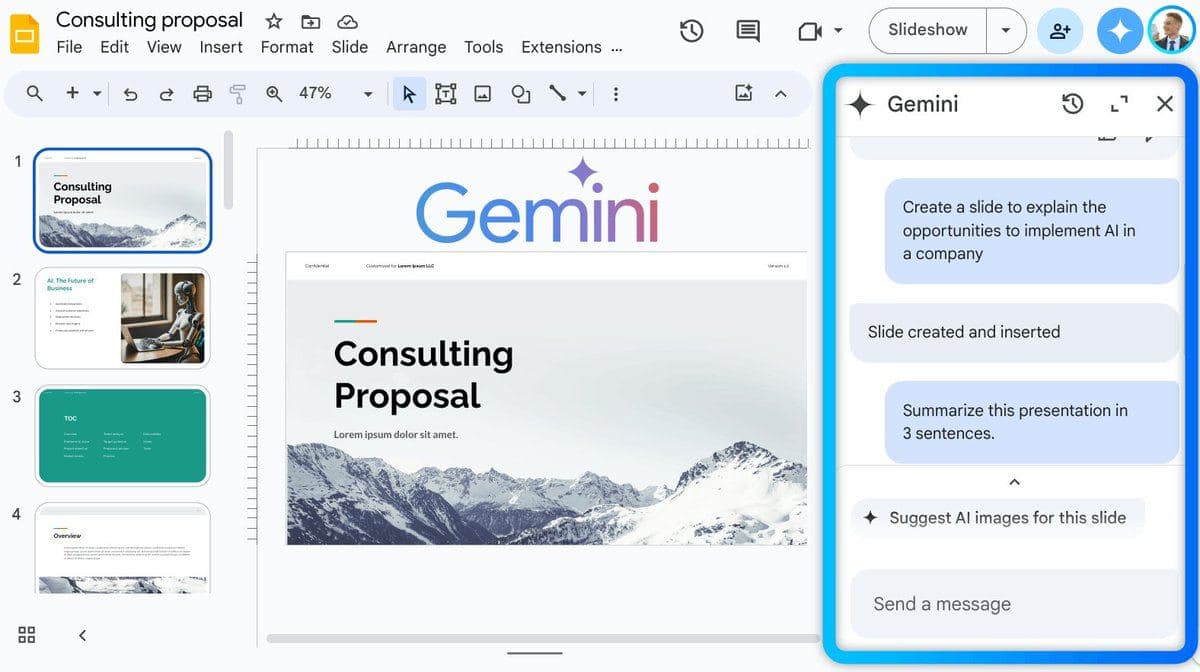
Google has introduced a new feature for its presentation creation service, Google Slides. Now, with the integration of AI Gemini, users can automatically create slides, images, and text, making the process of preparing presentations even easier and faster.
Slide Generation: To create a new slide, simply click on the Gemini icon in the top right corner and describe what you want to achieve. If the result is unsatisfactory, it can be easily regenerated and inserted into the presentation with one click.
Image Generation: There's no need to open a new tab to create an image anymore. Just click on the Gemini icon or replace an existing image, write your request, and choose a style. Select one of the four suggested images and insert it into the slide.
Text Summarization and Writing: AI Gemini can understand the essence of your presentation and assist in summarizing or enhancing the content. To do this, simply select the Gemini icon and specify what needs to be done with the text.
Access to the Gemini integration is gradually being rolled out to users registered in the Workspace Labs program and is currently available in English in 170 countries.